Thanks! Weridly, it’s still working with Vivaldi. Though I did find out in looking around that I screwed up my server’s IPv6 configuration, so nothing that tried to access it over IPv6 could resolve. That’s fixed now.
Maybe that’s what happened here? It’s odd that it would work for the atom feed, if that’s the case, but it’s consistent with the 404.
Oh wait - strange. That’s trying to … oh. OH! I think I see what happened and I think I was a jerk.
Had you loaded the RSS feed earlier - around when I first set it up? Feedbro is looking for it at tkr/rss and in some of the backend work I did change that to tkr/feed/rss. So if you update the URL to https://playground.subcultureofone.org/tkr/feed/rss, it should start to find it again. Sorry - I didn’t even think about breaking feed readers when I did that.
I’m adding it as a brand new feed, not using an existing one.
I copied it directly from the RSS link on Test tkr
so I put in https://playground.subcultureofone.org/tkr/feed/rss into the feed reader but it redirects to https://playground.subcultureofone.org/tkr/rss where as the ATOM does not redirect.
It’s also worth noting that when I try to add the URL https://playground.subcultureofone.org/tkr/ to my feed reader it detects no feed which means the feed URL isn’t in the header or something is up with the RSS formatting that is causing it to redirect like that, thus making it undetectable.
That’s odd - I’m not seeing that redirect in Vivaldi. I’ll look into it.
Is it typical for the feed URL to be in the header? I haven’t set up an RSS feed before, so I’m learning as I go with this one. If that’s the convention I can add that.
Thanks for trying this out. I have to switch over to work for the rest of the day, but I’ll be working on tkr this weekend.
Quick edit: I did a search and it does look like sites do typically include <link> tags for feeds in <head>. I didn’t do that. I’ll add it later today. Thanks again for pointing it out!
I don’t know if ‘typical’ but it’s certainly convenient because it provides a means of auto-detecting the RSS feed without looking for the direct link.
Like in my website right now, this is in the header <link href="https://armaina.com/rss.xml" rel="alternate" type="application/rss+xml" title="Recent Updates to armaina.com" />
so that if you put just armaina.com into any feed reader it’ll grab the RSS without the direct link itself.
And no rush regardless,
though I took a peek at the RSS and you have <link rel="alternate" type="application/rss+xml" title="Tick RSS" href="/tkr/rss/">
instead of <link rel="alternate" type="application/rss+xml" title="Tick RSS" href="/tkr/feed/rss">
so it seems like Vivaldi works because it ignores the link reference, but Feedbro does not, lol
Nooooo… foiled by the dreaded “it worked even though it shouldn’t have.”
Thanks for trying it out with a real RSS reader and for checking the page source. I definitely made a hash of the feeds. I read up a bit more and I don’t think I should have had the <link rel="alternate" ... > tag on the rss feed itself at all. That should only be in the header for the HTML pages - which as you noticed it wasn’t.
I’ve fixed them both and updated the test site. I just tried adding the rss feed into feedbro from the homepage and it worked, so I’m optimistic that it will work for you now, but let me know if it’s still broken. I’ll test the feeds with feedbro from here on out.
Custom emoji are working @Grubdog - right now it’s only unicode emoji. It doesn’t support images, largely because it didn’t cross my mind that so many custom emoji are images until after I got this working. Another thing learned (I mentioned I’m old, right? ).
Hopefully the unicode emoji set offers enough variety for now. I can work on adding images later.
Okay so now I really feel good about the app. I think it does its job and offers some nice customizability so people can personalize it. I’d like to support personalization as well as I can, so if you find yourself wanting to be able to tweak something that isn’t currently - uh … tweakable? - just let me know and I’ll see if I can make it work.
I’ll try to get this documented, packaged, and hosted tomorrow and then I think it’s ready for use!
Do people still distribute PHP apps as .zip files? It looks like that’s the case.
RSS feed validation (it worked, but I had some invalid configuration and bad XML escaping going on)
.htaccess - I haven’t used apache in forever and my initial configuration had the .htaccess file in /var/www/html, which I don’t think works for shared hosting. So I spent a lot of the day refactoring it so it works from /var/www/html/tkr (or whatever the apache document root is on someone’s system.
I also had some really janky cachebusting going on for development, so I cleaned that up.
I think the apache installation is now basically "unzip to /var/www/html/tkr and set your domain in config/init.php.
I’m just going to stop saying when I think I’ll be done because I keep being wrong, but it is close. Not sure how much time I’ll get to work on this tomorrow, but I’ll work on it as I can over the week.
This is awesome, great work! If you’re up for it, it would be awesome to have the source code available on a git server, perhaps even git.32bit.cafe :)
Thanks! I have the code up here, and was wondering if it would be appropriate to host it on git.32bit.cafe. I just keep forgetting to ask. I’d be happy to move it over.
I’ve updated the project README with more thorough installation instructions. I’ve tried to make the installation as straightforward as I can, but there may be issues. I think the last time I wrote software that was intended to be installed by someone who isn’t me was something like 2000. Please let me know if the instructions are unclear or don’t work, or if I could do anything to streamline the installation process.
@yequari - I tried to move the project over to 32-bit cafe git, but I’m not getting emails when I try to set up SSO, so I’m not able to log in. I probably messed something up. Nothing urgent, but as soon as I get that hashed out, I’ll set up an account and move it over. I’d like to start shifting to smaller services and providers and I think hosting this here makes a lot of sense, since this is where I got the idea.
@armaina I’d like to add an Acknowledgements section to the README. I wanted to acknowledge you for the idea and add a link to your site. Would you be comfortable with that? If not, I won’t do it. No worries.
I’ve set up a live instance at https://tkr.subcultureofone.org. I was able to install it from scratch by following the instructions, so I’m optimistic about that, but just let me know if you try it and have trouble.
There’s still a lot I’d like to do (noted in the README), but I’m going to slow down a bit now that there’s something releaseable. I could use a little break and if people do start trying it out, it’ll be easier to fix things if I’m not also making other changes at the same time.
Thanks again for all your patience and all your support. I’ve had a great time doing this and I’m excited to see it come to life. I hope you enjoy using it if you choose to, and if you don’t it’s been fun for its own sake, so all good!
All pages free of accessibility warnings and errors (evaluated with https://wave.webaim.org). All pages are keyboard-navigable.
Default CSS is simplified and the presentation is lighter weight. I wasn’t thrilled with the previous look after a couple days. This one’s working better for me.
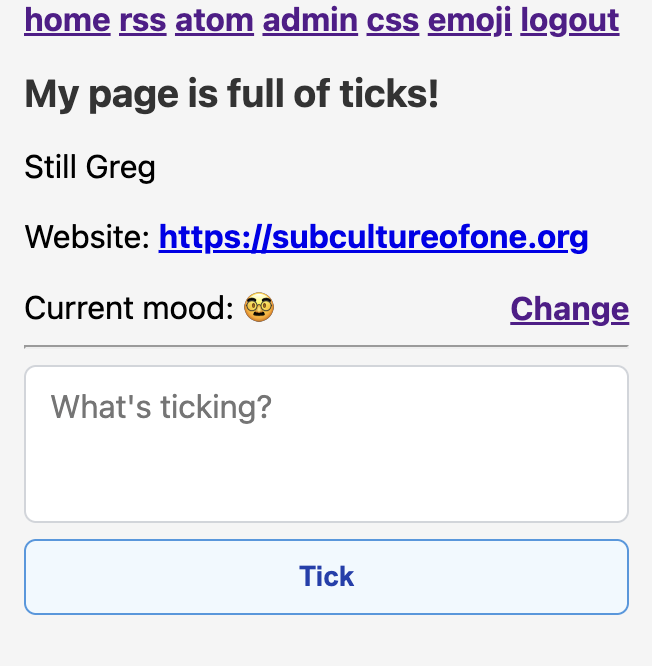
Mood emoji are now saved with ticks. The display can be toggled in settings.
Added a “strict accessibility mode” that forces all hyperlinks to be tab-focusable even when browser settings disable it. This is the default. It can be toggled off in the settings.
I learned a lot about semantic HTML, web accessibility, and CSS while getting this ready. I still have a ton to learn, but I’m optimistic that this is at least not a semantic or accessibility disaster.
I’ve put together a roadmap of sorts for everything I’d like to do before tagging it as 1.0.0. It’s in the README if you’re interested in what I’m planning. I’m thinking that the x.y.5 releases will be infrastructure things (tests, automatic builds, etc.) and the x.y.0 releases will be functional enhancements (microformat support, customizing time zone and time display, etc.)
I hope I’m not making this too “corporate web” with all this. It’s just helpful to me to have a high-level plan for where I’m going. This isn’t cast in stone, but I think it’s mostly what I’ll end up doing.
If you’re running an earlier version, you should be able to just unzip this right over top of it to upgrade. Note to self - upgrade instructions would be a good thing to put in the README.
Quick update because I’ve been quiet for a couple weeks. I’ve made some pretty significant progress, but it’s mostly been infrastructure stuff. Here’s a summary:
The tkr package is also hosted on the gitea site now, at the packages tab.
I’ve set up automated testing and have written one whole test. Now that the plumbing’s all in place, it’ll be more straightforward to add more. This’ll make it easier to catch when an update breaks things.
It automatically builds the zip archive when I tag the repo now.
I’m keeping the github repo up-to-date, but I wanted to give tkr (and possibly future apps) a self-hosted home that’s more in keeping with the spirit of the personal web.
While this isn’t a lot of visible change, it makes the whole project feel more real to me. It’s especially nice not to have to build the package and copy it to hosting by hand. This’ll also make it easier for me to provide a docker version of it.
I probably won’t make much more progress over the next couple weeks. I have a busy work week this week and then I’m doing a charity bike ride all next week and will essentially be off the grid (which I could use). But I haven’t dropped this. I’m still having fun building it.
That would be great! If you do try it, I’d love to know what I could do to improve the installation and initial setup. This is the first time I’ve made a PHP app for distribution and I’m a little worried it’s in “works well enough for me” condition.
How did those LiveJournal mood themes work? I looked around a bit and it looks like there was a list of moods, and then you’d select a theme and it would change all the images for the moods to match the theme. Is that how it worked, or am I misunderstanding?
I’m starting to wonder if I should overhaul the moods (probably as a post-1.0 thing). I feel like I’ve kind of misunderstood them.


 - right now it’s only unicode emoji. It doesn’t support images, largely because it didn’t cross my mind that so many custom emoji are images until after I got this working. Another thing learned (I mentioned I’m old, right?
  ).
).
 I’d be happy to move it over.
 and if people do start trying it out, it’ll be easier to fix things if I’m not also making other changes at the same time.