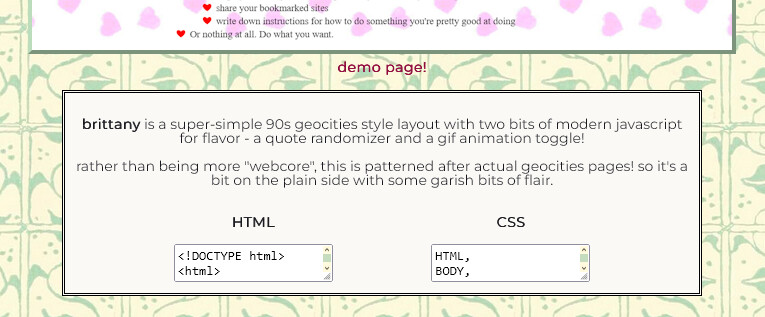
sooo i have a premade layouts page, and on that page i have the code for each layout in a convenient textarea for copy-pasting. i like it this way! i think it is handy and keeps everything from feeling too scattered. like so;
HOWEVER. neocities’s code editor starts lagging if the code is too long, and this page is over 5000 lines which is too much for its feeble constitution. editing the page feels kind of precarious and takes longer than i’d like. i do my pages in vscodium on my computer, which does not lag, and the page loads fine for a visitor (as far as i know) so it’s not a huuuuge problem, but it is annoying!
so! questions!
q1: any workaround suggestions for the lag?
subqs: is this a “neocities” problem or just a “your page is too big” problem that would also be a problem on other free webhosts? i use firefox, is it possible neocities would be more cooperative in a different browser? is there some way to get it to stop being so laggy that i don’t know about?
i was thinking i could maybe put the textareas on different pages and embed them via iframe to keep them in the spots they already are to offload a bunch of the code elsewhere, but that seems kind of silly (and annoying, since iframes are finicky to position and size).
q2: i could move the code textareas elsewhere - onto the demo pages, for example - what do you think of that from a “browsing and potentially using a premade template” point of view? it seems clunky and a bit unintuitive to me.
i think it may be neocities’s problem, although most code editors should be able to handle 5000 lines with no trouble, but maybe neocities’s editor isnt really made with handling thousands of lines in mind?
i think moving them to the demo pages could be a solution, but i also thought of
packing the html and css files into a zip file and let people download that directly. but youll need supporter to upload the zip to neocities; otherwise youll have to host it somewhere else
just uploading the templates themselves, and then linking them to download with <a href="template.html download>
uploading them as .txt files and link to those… hopefully when they click it open itll show a plaintext page where they can copy and paste the content? i havent actually tested this before
This is absolutely a Neocities issue. Nearlyfreespeech sites (and the editor I use, Phoenix) might not have this problem but I cannot verify this yet. Like the other poster said, bundle your code into a portable zip file! To add onto this, archive your zip file’s page via the Wayback Machine so you can have an archived version as well!
zip file not an option as i don’t have money to pay for supporter sadly! it’d be nice, though. it’d be fun to put together little packages with images and stuff for people. i hadnt really considered downloading as an option in general, so that’s something to ponder.
If you code in VSC, why are you using the neocities code editor, if you don’t mind me asking? If it doesn’t lag for users (which I can attest to as I’ve visited this page of yours), I’m a little confused as why it’s a problem at all.
Are you updating your site manually? Like dragging and dropping the files in? Or copy and pasting? Because if that’s the case, then using git would eliminate the inconvenience at least.
yes, i update my site manually! generally i drag n drop upload the files from my computer if it’s a new page and copy-paste things into the code editor onsite if it’s edits to an existing page. small edits - missing brackets, typos, rephrasing - i do in the code editor ! copy + pasting and making small edits are both much more difficult when it’s lagging.
i’m not a computer person and do not really know what git is, just that it’s something a lot of people use and presumably is related to github in some capacity! i would need a tutorial aimed at people who are bad at computers, which i often can’t find when it comes to intermediate-advanced web dev stuff :')
you can avoid the neocities editor completely by drag and dropping the updated page, just like you would if it was new. an upload with the same name as an existing file will overwrite the old one. that’s how i updated all my pages when my site was on neocities!
git is a system for keeping track of all the changes made to a project. i can imagine how it would be useful for complicated software projects, or anything where multiple people are making edits to the same file, but for a website being updated by a single person… i think it’s overkill! not trying to discourage you or anyone else from learning more about it if you’re interested, but if you’re not then don’t worry about it at all.
(my experience as a hobbyist: i have one site with a git repo and dealing with it is so boring to me that i almost never update it. i love drag and drop! i don’t care about keeping track of every little typo fix!)
If you want to keep an identical appearance you could move the several <textarea> or the <div class="htmlncss"> out of the page and into separate files, then pull them back in with JS. h-include can do that if you don’t want to write any JS yourself.
I use it moreso to eliminate friction to updating my site. Having git means I can publish all my updates with a single button from VSCodium and that is literally the only reason I use it lol.
I actually have no idea what I’m doing with git, so you’re not alone! I used this guide which was made for people like us. It really holds your hand about it, so if that is something you want to pursue, it is entirely possible for you to do it.
Just to be clear, does the code editor lag or is it the page when you view it? It doesn’t seem to me like this would be a particularly heavy page in terms of viewing.
If it’s the code editor, then agree with other posts. Don’t use it. Any code editor will do the same job, even plain ol’ Windows notepad works. Save your code as .html or .css files, then upload them manually to Neocities.
 sooo i have a premade layouts page, and on that page i have the code for each layout in a convenient textarea for copy-pasting. i like it this way! i think it is handy and keeps everything from feeling too scattered. like so;