Hey guys, I just got back into actually doing something for my website and noticed that it’s very tedious to update the header of my site, because it’s at the top of every page. Is there a way, I’m hoping this will work through CSS somehow, that I can basically write the header for my website once and then import it into all the pages. That way, I could edit the main file once and change the header across all pages.
By header I mean the top of my website, with an image and a bunch of navigation links.
I do this with the sidebar of my website, it uses javascript.
My sidebar.html file is just the code for the bar itself, <div>s and such, no html/head/body/etc - you can see it here if you wish. (If you inspect, your browser will probably insert the html/head/body tags but they are not in the file itself)
On my pages meant to be viewed, in the head I have this script: <script src="https://www.w3schools.com/lib/w3data.js"></script>
At the bottom of the body is this script: <script>w3IncludeHTML();</script>
And where I want the sidebar to appear I have this: <div w3-include-html="/sidebar.html"></div>
When I want to update the sidebar, I just make a change to the sidebar.html and it goes to all webpages.
If you want an option without javascript, you can look into a static site generator program like 11ty, where it will generate the updated files for you without you having to manually update each page yourself.
Thanks for this. I’m not really fond of either of these solutions :L If changing everything manually becomes too tedious I’ll have to resort to JS though
When I was looking up how to do it, there was a php method as well, you could probably find that. I’m using neocities as my host though and they don’t support php.
there’s a couple different ways to do it! javascript is one. you could also use SSI (server-side includes), a static site generator, or iframes. i think php can do this also? i don’t know much about PHP or SSI or SSGs, but iframes are quite popular as a solution and relatively simple. they all have very different workflows and are very different ways of building your site, though, so which works for you will vary a looot. it also depends a bit on where you’re hosted - neocities doesn’t allow server-side includes or php, for example.
there is unfortunately not a single easy css solution!
If you don’t want JS and can’t use a dynamic language like PHP, you could use frames in HTML. That is pretty bad advice though given that the W3C says no one should use frames anymore.
With that in mind, maybe changing the site is something you could do down the road. In the short-term, using a find/replace function in your editor would help you change it once and then basically copy/paste it to all th eother pages.
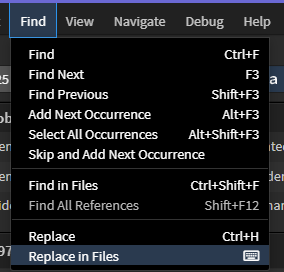
so, every year I have to update my website’s copyright dates to reflect the new date. I don’t have any server side includes for this (though I could if I wanted), instead I just use the replace in files in phoenix code.
Because of the way it works with project folders, I make sure I have the whole directory as my current project in the application and then it’ll find all files with that specific string in the directory and replace them with one click. After that, all I have to do is save the files. Done. Only took a few seconds.
It can replace a lot of text so you could use it to change quite a lot. Though IDK what your hosting situation is like but if your site supports server side includes you may want to look into that if what you’re replacing is particularly significant.
If PHP is available to you, that’s probably the easiest way to do it. I can give you specific instructions on how to do this, if you like.
I think with modern CSS you could do it too, but you’d get into some weird ::after and other rules to add text and such. I don’t think you can add links with CSS, though.