in short, my workflow is Bad. i started out with Neocities, which is very much “whatever go my notepad”. worked well enough, but then i moved to a dot com with Cloudflare and my ambitions with the site grew.
problem is, i am incredibly intimidated by the Cloudflare interface - feels like really diving in the deep end - and the current “test on Neocities deploy on Cloudflare” strategy seems… unscaleable. experimenting takes too long and i don’t like how Neocities just, updates my site without any option to test stuff beforehand. very inefficient (and scary).
how do you keep up a good workflow for iteration and testing? i want to do so much more with my site (essays, blurbs, rss, contact) but it’s hard to just, play around with the current system i have. i know how to code from googling, bodged scripts and one (1) year of CS so my habits are uhhhhhhh yeaqh
Did you know that your browser can open web pages that live on your computer? You don’t have to upload in order to test a change. As long as you’re using relative paths correctly, stylesheets, graphics, and JavaScript will work locally, too.
gave it a try, but for some reason it seems to not be working right :< even though it’s looking fine online, something about the paths ain’t registering (specifically the stylesheet). but nothing i can’t debug. thanks for the idea! much simpler than the prospect i had of keeping separate experimental deployments and the likes. imma get to debugging^^
I’ve found that when relative file paths aren’t working for me in browser tests, I can get ones that do by opening a file in my browser and copying the path that it shows in the URL bar. Might not be the most efficient approach, since you’ll have to change them back before uploading, but it works.
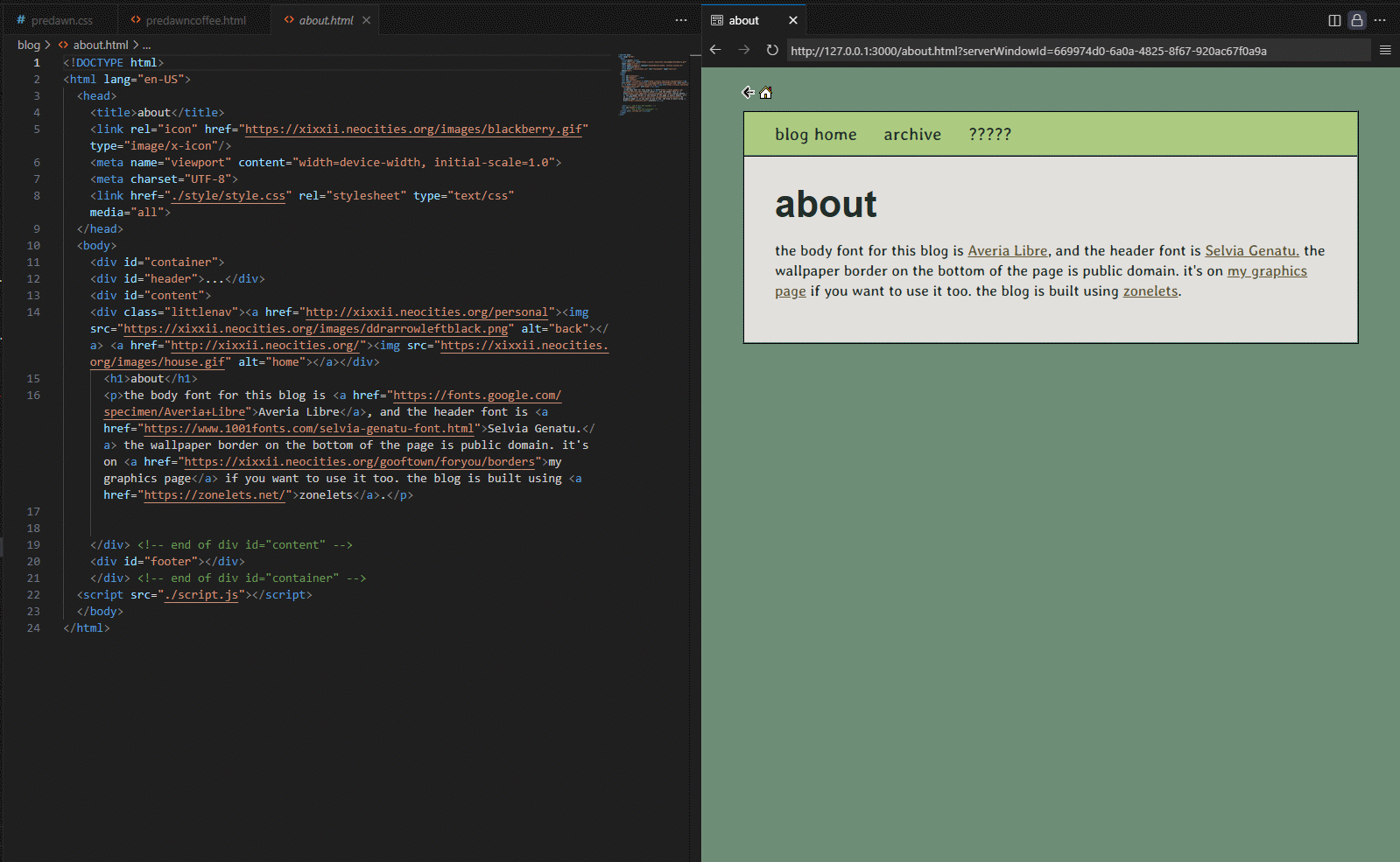
vscode (or vscodium, an opensource version of the same thing) is what i use for working on website stuff; it has a live preview function which i find very helpful! it sounds like that might be useful for you? you can have several little panels open at once, so i do html and css on the left and the live preview on the right. here is a screenshot for example!
i recommend it! i can get everything finished and then upload it and then i usually only need to tweak a few things on neocities proper. im not familiar with cloudflare at all so can’t help w/ that side of things though.
@Coyote i figured out that (on windows at least) it didn’t like relative file paths, but it was okay when i, for example, directed a back button to “index.html” if they were in the same folder. but it didn’t like “/” as a destination. maybe that proves useful? in any case it solved that for me
@manuelmoreale i’m on windows, started on linux so i’m not entirely used to the tools and naming conventions on this one^^
@xixxii that seems perfect, thank you! exactly what i was looking for :> on cloudflare i figured out i can deploy a dummy website on a random domain which works well enough as a test run. but having an even faster feedback seems sweet
This is some moderately time- and energy-intensive advice, but have you considered using XAMPP on your local machine? It’s an actual Apache2 server (among other things) - just like your web host’s server - that runs right on your Windows computer. It displays in the browser from localhost instead of from your actual files, and if you ever decide to branch out into like PHP or find yourself wanting to play with databases or something you already have everything you need.