Does anybody have a rec for a good FTP client for Linux?
Damn, I don’t, actually. Most times I’d reach for the command line or re-download FileZilla if I needed a GUI.
Following for any recommendations through…
If you happen to have a straightforward tutorial on command line ftp I’d be interested. ;)
What are your use cases for FTP? Transferring files to web server? Does your web server support RSYNC?
following! i use filezilla on elementaryOS for transferring of files but i can’t edit files in the program for some reason. so i have to flip back to the file explorer to actually edit stuff, then drag it into filezilla to upload.
I just use sftp. Sorry.
Yeah, just uploading files. I’m not sure if they support RSYNC, I’m trying out Teacake at the moment.
If they support sftp (FTP over SSH) then rsync shouldn’t be a problem.
FileZilla, if it’s in your distribution’s repositories. Otherwise, gFTP.
If I want a GUI on Linux, the default file manager for my desktop environment can usually connect to remote servers.
For example on Dolphin (KDE) you can put an ftp:// URL into the address bar.
My current terminal of choice on Windows, Tabby, has an SFTP button on it that can sync with the current directory of the shell, making it pretty quick to do a file transfer while working in the terminal.
Depending on the machine and os I use, winscp, gftp or filezilla is used.
They’re all open source and capable of most tasks.
/* I wanted to link all of these ftp clients for user convenience but how am I supposed to post links here? trying basic markup now, wish me luck  didn’t work out - I’m not allowed to post links here */
These days FTP itself is fairly uncommon, but many places and people will refer to SFTP as “FTP” – on Linux for the GUI, I always liked FileZilla.
Double check if you’re able to use SFTP with your host as the tools for using SFTP via a command line are much much nicer than standard FTP many of which haven’t been updated in a long time now.
I’m a big fan of the rsync command, which if your host supports it can make your life much easier.
For example, I keep a complete copy of my website on my laptop, and when I change it I can run a quick rsync command and it’ll update only the files which need to be updated, which is usually very few.
Who is your web host?
Don’t mistake FTPS (which is just FTP over an encrypted connection) for SFTP (which is file transfer over SSH). Both are a thing; the former usually as default for FTP, and you’ll probably know if you can use the latter.
Yes, this is confusing. Even some apps make it unclear which one they mean.
2 Likes
I’ve yet to ever see an FTPS connection, but I see them referenced occasionally. Do you know of anything or any hosts which offer them? It would be a useful thing to be able to test.
All of them nowadays, in my experience. They just advertise it as plain FTP usually. You have to look at the client’s message log to see what it really is.
What nosycat has written is true. I havn’t seen a single non ssl ftp in years (except download only servers. These will stick around for some time)
1 Like
I come across a fair amount of standard FTP servers unfortunately. Legacy hardware that will never support anything else is still being used in enterprises. There are multiple “FTP for AWS” solutions out there.
I have an FTP server at home where only a selection of old Macs and UNIX machines on my LAN are using it as it’s a great way to get software onto older machines without the need to image floppies or deal with aging SCSI CD-ROM drives.
I started out using FTP Explorer for Windows in 2002, which is still going strong; I switched to FileZilla somewhere before 2005 and never looked back. Does everything you’re likely to need.
I remember that I have an ancient folder of screenshots and there’s one from FTP Explorer in there, dated August 2004:
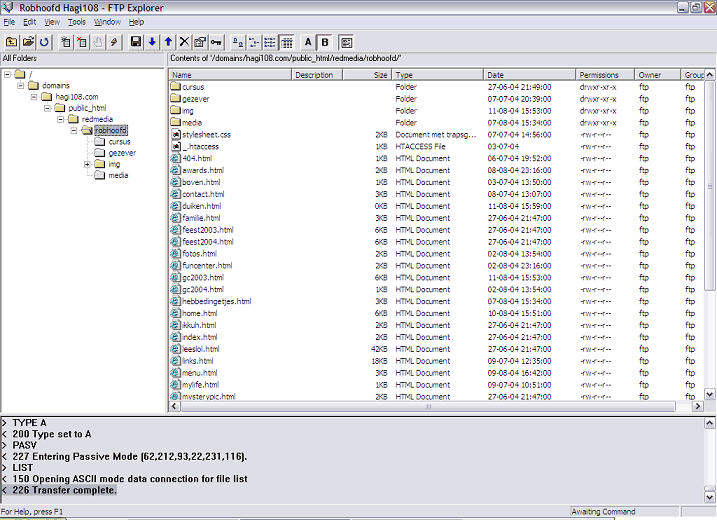
Ah, sweet memories.
1 Like