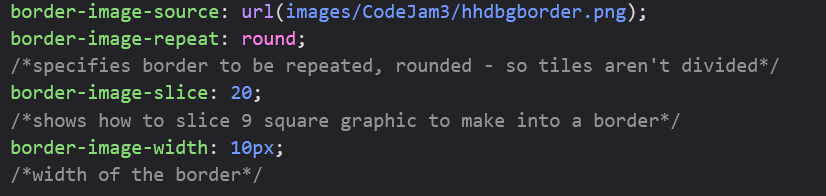
I’ve created and uploaded a 9-patch border for my site, but it’s not working (I get a plain white rectangular border instead of the border I made.
.cloudborder {
 border-style: solid;
 border-image-repeat: url(cloudborder.png) 12 12 12 12 fill / 12px 12px 12px 12px;
}
And here’s my homepage where I’m trying to apply it. And the border itself.
Where is “cloudborder.png” located relative to your homepage? If it’s not in the same folder, your current stylesheet won’t work.
It’s in the main folder, so there shouldn’t be a need to specify.
Looking at your CSS with dev tools, your cloud border styling is completely crossed out! The flag says, “invalid property value” so “border-image-repeat” is not an accepted CSS property. Just change it to “border-image” that should fix it.
.cloudborder {
  border-style: solid;
  border-image-repeat: url(cloudborder.png) 12 12 12 12 fill / 12px 12px 12px 12px; /*This part is crossed out*/
}
Change it to this:
.cloudborder {
  border-style: solid;
  border-image: url(cloudborder.png) 12 12 12 12 fill / 12px 12px 12px 12px;
}
Okay, I did that. It’s up, but it’s all stretched out. I know I probably need to get rid of Fill and put Repeat in there somehow, but I’m not sure how.
Oh sorry. I didn’t realize it was stretched!
This is a useful guide: border-image - CSS | MDN
try this:
border-image-slice: 18;
And remove “fill” from border-image:
border-image: url(cloudborder.png) 12 12 12 12 / 12px 12px 12px 12px;
.cloudborder {
  border-style: solid;
  border-image-slice: 18;
  border-image: url(cloudborder.png) 12 12 12 12 / 12px 12px 12px 12px;
}
Still stretched. Hmm. Is 12 too small a number?
It might be depending on what your styling is supposed to look like. Maybe just try…:
.cloudborder {
  border-style: solid;
  border-image: url(cloudborder.png) 19 19 19 19 / 19px 19px 19px 19px;
}
Also try adding:
border-image-repeat: repeat;
Now it shows just the corners of the border with nothing in between.
@Manatee , I’m the absolute last person to be giving coding advice but I did make a 9-patch border one time and got it to work. I got my code from W3 schools and just tinkered with the values until it looked right. I don’t promise this is good code! It’s what worked for me, though. This is the page it’s on and this is what it looks like:
Sorry, I haven’t quite cracked it yet–I love CSS but am not a master. Try:
.cloudborder {
  border-style: solid;
  border-image: url('cloudborder.png') 18 18 18 18 / 18px 18px 18px 18px;
  border-image-repeat: round;
  border-image-slice: 12;
}
if the previous suggestions dont work, try:
.cloudborder {
    border: 10px solid transparent;
    border-image: url(cloudborder.png) 10 round;
    image-rendering: pixelated;
}
A little explanation for each line (in reverse order):
-
image-rendering: pixelated; this is to make your pixels sharp since its a pixel border
-
border-image: url(cloudborder.png) 10 round;
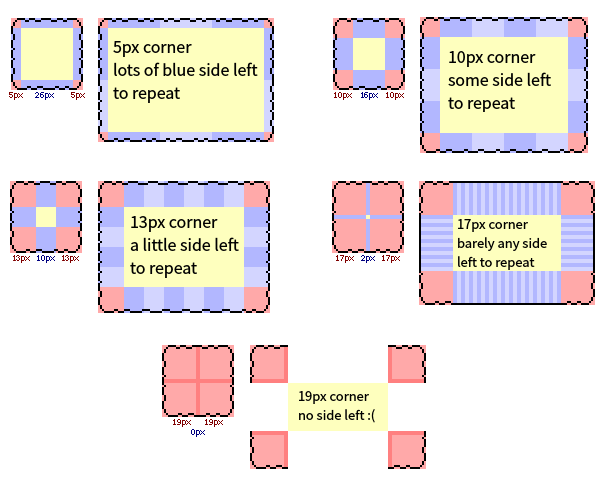
10 means a 10px square, this is what i chose for css to consider the corners of the border, i wasn’t exactly sure what you considered to be the corners of the border, so i guessed, test out different sizes to see what you like best- Your border image is 36px by 36px, so this takes a 10px square from each corner to use as the borders corner, the rest (36 - 20 = 16px) is left over as the side borders.
- 16px in the middle of each side will be used for the side borders
- This is why 19px didnt work, because it took everything as the corners, leaving none for the border (36 - 38)
round this just makes your border repeat rather than stretch
-
border: this needs to be transparent to let your image show through
- you will want to make the width of this the same as your corner (
10).
- if you change the corner size, be sure to change the border width too, this is less important for non pixel borders though
- if you want the pixels to be more visible, try using 20 for only border width (use only multiples of the corner since its pixelart), but be sure to keep the border-image corner as it is
edit: heres a diagram!
2 Likes
Thanks, this worked. But maybe I need to redesign the border. It looks very thin, and I’d like it to look a bit bolder. Maybe I should’ve done 30*30 for the pixel art?
Update: Here’s my homepage now. Looking pretty good, though I might need to edit the middle squares of the artwork a bit to make it look more cloudlike. :)
1 Like
Awesome!! I’m glad it worked ^^
1 Like